PROMO 2026
Get a FREE Push Notifications System
Also a FREE Progressive Web App with your PROMO2026 Purchase. limited time only
Push Notifications System
It will Keep your clients and prospects updated with real-time notification messages directly on their phone.
Send instant or scheduled messages directly from your smartphone or desktop to engage your audience and drive actions.
- Forget bulky wallets stuffed with cards—Go Virtual with a slick online Business Card Site.
- Share via QR scan or link, and recipients save it instantly to their contacts list. Add animations, links to your work, even video intros.
- Best part? Update your infos anytime
- Eco-friendly—no trees harmed.
- Network smarter, not harder.
- YOU GET A PWA—(progressive web app)—is a slick, app-store-free way to get your app on devices. Just scan a QR code or click a link, and boom, it's installed—no downloads, no hassle.
- Works online or off, saves space unlike clunky traditional apps, and pops up on phones or desktops.
On Windows, it even lands in the Start Menu like a native app. Perfect for sharing contact info or Virtual Business Cards without the fuss. - Imagine skipping the app store drama entirely—just one click or QR scan, and your Virtual Business Card or App is live on any device.
Progressive Web Apps are lightweight, no-storage hogs, work also offline, and sync seamlessly across phones and PCs directly on client device, it's right there on their Start Menu, game-changer for sharing contacts or services! - A digital business card is like your traditional one, but smarter—shareable via QR codes, links, or apps, no paper needed.
- Instant, eco-friendly, and always updatable, so no outdated info floating around.
- Scan Qrcode to save Contacts infos directly to phones, add links to portfolios or socials.
- Perfect for networking on the fly—professional, modern, and zero waste.
- Create your Curriculum Vitae (CV) Outlining your comprehensive academic and professional history.
Everything you need to succede
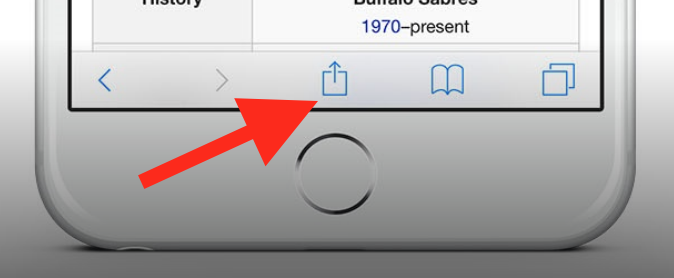
To add this web app to your homescreen, click on the "Share" icon
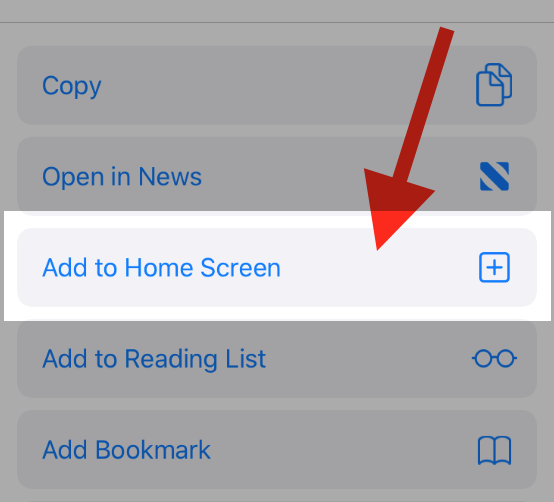
Then click on "Add to Home"
To add this web app to your homescreen, click on the "Share" icon
Then click on "Add to Home"
It looks like your browser doesn't natively support "Add To Homescreen", or you have disabled it (or maybe you have already added this web app to your applications?)
In any case, please check your browser options and information, thanks!
It looks like your browser doesn't natively support "Add To Homescreen", or you have disabled it (or maybe you have already added this web app to your applications?)
In any case, please check your browser options and information, thanks!